
As a freelance Unreal Engine Developer, I had the opportunity to work at SPAR, a startup focused on AI-driven virtual avatars. Over a year, I explored Metahuman Technology and its integration with AI to create realistic conversational partners.
Despite being the sole Unreal Engine Developer for most of the project, I was fortunate to receive guidance from people more experienced than me. This blog shares the key learnings, challenges I encountered, and solutions we implemented to achieve an immersive AI-powered Metahuman experience.
Project Overview
The goal was to use Unreal Engine’s Metahuman Technology and AI to create a realistic conversational experience. The avatars were hosted in the cloud and streamed via Pixel Streaming into a React Web App, providing an interactive experience similar to Zoom or Teams. After each conversation, or should I say ‘Spar’ 😉, the AI analyzed and provided insights for improvement, allowing users to refine their communication skills.
Exploring Different Lip-Sync Solutions
I tested multiple approaches to achieve real-time Metahuman lip-syncing with AI-generated responses.
1. NVIDIA Audio2Face
I initially tried Audio2Face via NVIDIA Omniverse, but running that alongside Unreal Engine simultaneously was inefficient and resource-intensive. However, the new NVIDIA ACE is looking quite promising.
2. MetahumanSDK
I also tested MetahumanSDK. While easy to implement, it had a response time of ~6 seconds, which was too slow for real-time conversations. This made the solution impractical for our use case.
3. Our Custom Solution
Since existing solutions didn’t fit our needs, we licensed a third-party solution that does all the lip-syncing inside the Unreal Engine project. Without sharing proprietary code, the system worked by:
- Retrieving timestamped viseme data from AI-generated speech. This info was transmitted via the web socket.
- Animating facial expressions based on visemes to ensure natural lip movements.
This approach enabled real-time, high-fidelity lip-syncing with minimal delay, ensuring a smooth conversational experience.
Enhancing Realism using Animations
Just animating the mouth wasn’t enough. To make the Metahuman avatars feel more natural and engaging, I implemented additional enhancements:
- Subtle body and hand movements to avoid robotic stillness.
- Dynamic Facial Expressions and Body Language:
- The AI analyzes the tone of the generated response.
- The result is forwarded to the Unreal Engine app.
- Face and body animations are selected to signify emotions like Angry, Happy, Joy, Satisfied, etc.
- Three animation states:
- Idle: Default neutral posture with breathing animation.
- Listening: Animations like head shake, nodding, etc. to signify different emotional state.
- Talking: Blends face and body animations with lip-sync animations.
These improvements significantly enhanced realism, making the avatars feel more lifelike and interactive.

Switching Metahumans and Backgrounds
Since different ‘Sparring’ sessions required different conversation partners and environment, we needed a way to switch Metahumans and backgrounds dynamically without affecting performance.
Backgrounds:
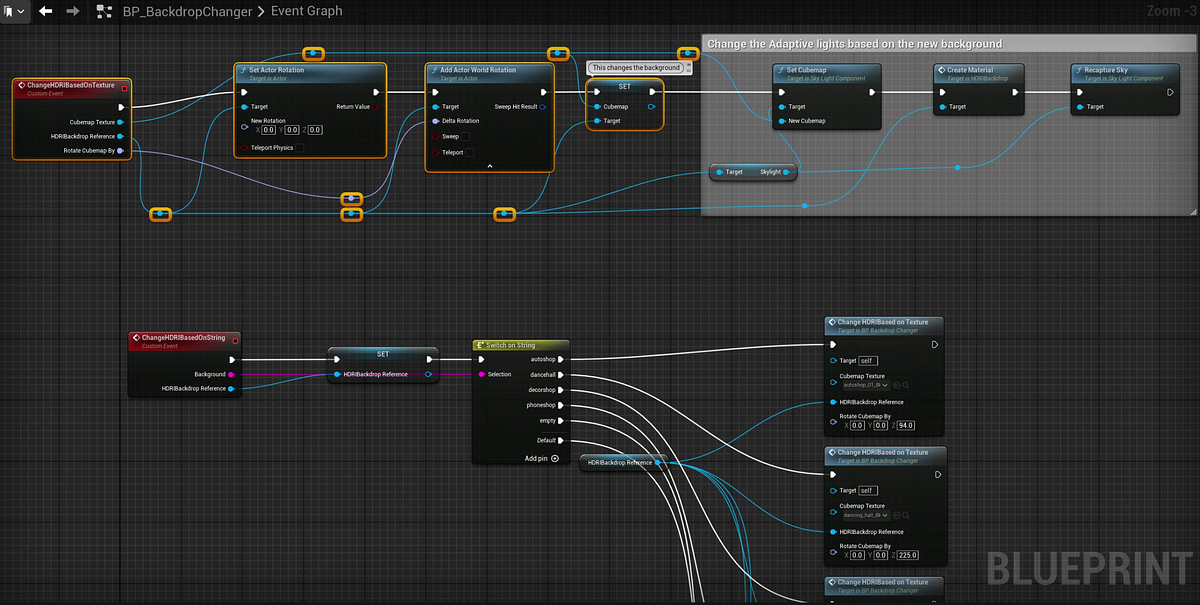
I used HDRI Backdrops for backgrounds since they are very lightweight. Under the hood they are just 360-degree images (cubemaps), making switching them at runtime a breeze.
Metahumans:
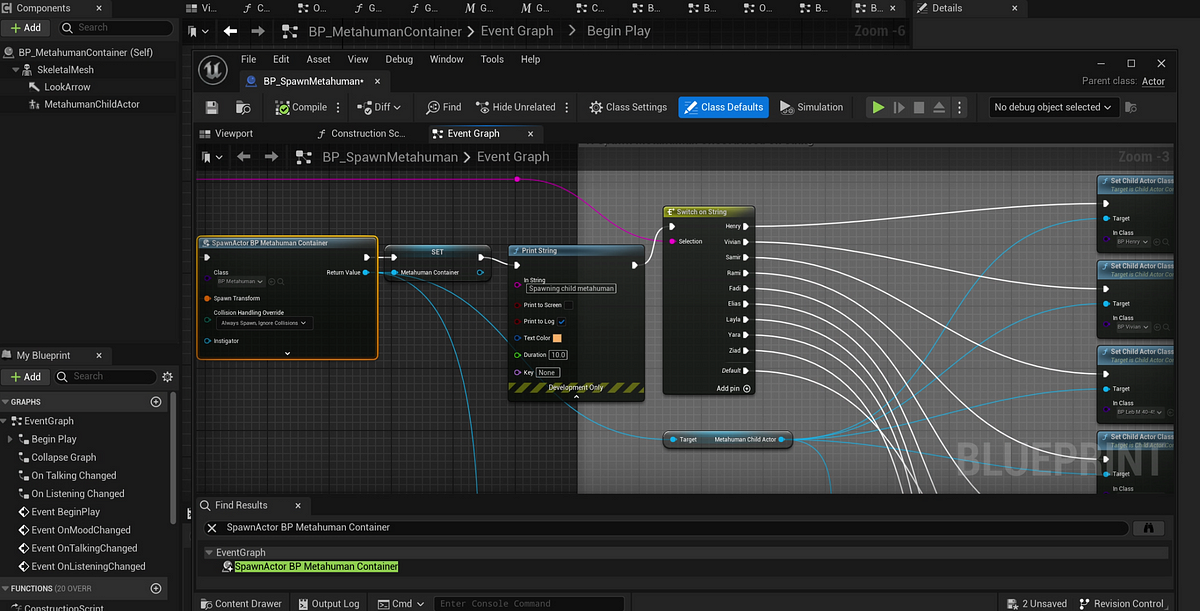
Metahumans posed a challenge as each was ~800MB, making simultaneous spawning impractical. The solution:
- Created a Metahuman Base Class that handled lip-syncing and server connection.
- Converted all Metahuman Blueprints as children of this base class, ensuring efficient inheritance and easy switching.
With Unreal Engine 5.5, you can download an optimzed version of the metahuman, reducing the size from ~800MB to ~80MB.
Switching Logic:
- During Runtime: WebSocket request trigger Backdrop and Metahuman changes.
- At Launch: Parameters are passed as command-line arguments and parsed in Blueprint.
// Use C++ to create a custom node and use that node to retrieve command-line arguments from Blueprint.
void UParseCmdLineArgs::GetCommandLineArguments(FString& Metahuman, FString& Background)
{
  Metahuman = FString();
  Background = FString();

  const TCHAR* CmdLine = FCommandLine::Get();
  if (CmdLine == nullptr)
  {
    UE_LOG(LogTemp, Error, TEXT("Command line is null."));
    return;
  }

  if (FParse::Value(CmdLine, TEXT("metahuman="), Metahuman))
  {
    UE_LOG(LogTemp, Log, TEXT("Metahuman Argument: %s"), *Metahuman);
  }

  if (FParse::Value(CmdLine, TEXT("background="), Background))
  {
    UE_LOG(LogTemp, Log, TEXT("Background Argument: %s"), *Background);
  }
}
// Run the executable with extra arguments.
SparUE.exe -metahuman=layla -background=autoshop
Communication Between UE App and React Web App
Since the Unreal Engine and React Web App were separate entities, real-time communication was essential for a better user experience. I leveraged Pixel Streaming Events:
1. Communication from UE to Web:
To notify the web app when Metahuman is speaking so that the speaker's video stream can be highlighted (similar to Zoom speaker view) for a better user experience.
2. Communication from Web to UE:
To detect when the user started speaking so the Metahuman’s listening animation could be triggered, ensuring the avatar appeared engaged.
Final Thoughts
This project was a huge learning experience, especially as I had limited Unreal Engine experience before starting.
Reflecting on the experience, I’ve discovered that while Unreal Engine offers exceptional flexibility, it requires thorough optimization to achieve optimal performance. One significant insight was that creating convincing AI avatars extends well beyond lip synchronization — the subtle body language elements are essential for creating a truly human-like presence.
I’m grateful for the guidance provided by the SPAR team throughout this process. And I’m genuinely excited about the future possibilities for AI-powered avatars. It’s been a privilege to contribute to this evolving technology.
For more info, check out the article by our founder Henry Obegi
I’m not an expert in Unreal Engine or AI — just someone who jumped into the deep end and learned along the way! Feedback and insights are always welcome.